Back to marketplace
AA and AAA Desktop Battery Organizer with Fresh and Used Sections

AA and AAA Desktop Battery Organizer with Fresh and Used Sections

By Jonathon Ringeisen · Saved version 1

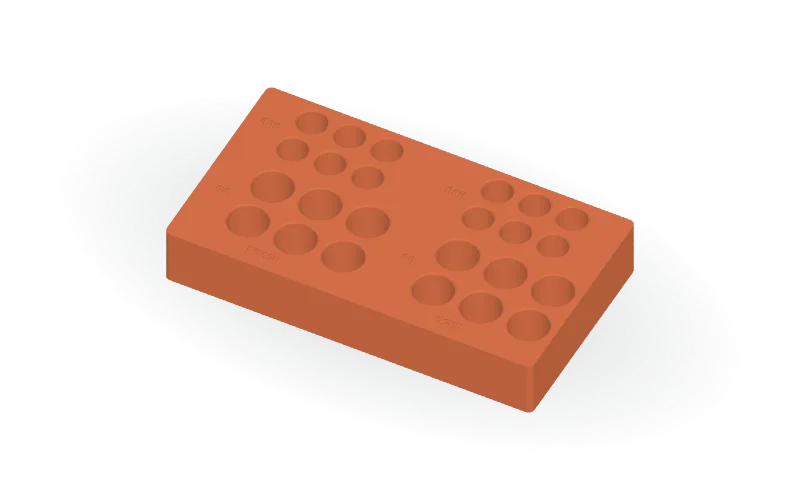
Keep upright batteries sorted in a rectangular desktop organizer with separate FRESH and USED sections. The default layout provides 24 blind pockets: six AA and six AAA in each section. Rounded outside corners, chamfered pocket entrances, a flat bottom, and recessed size labels complete the design. The editable OpenSCAD source calculates the footprint from your layout. Adjust battery diameters, clearance, pocket depths, row and column counts, wall and floor thicknesses, spacing, corner radius, chamfers, and label settings. Built-in geometric lettering requires no external fonts. A two-pocket fit-sample mode generates one AA pocket and one AAA pocket; increase diametral clearance for a looser fit or decrease it for a tighter fit. Available formats: STL, 3MF, and OpenSCAD.

Copy this community design to your library to customize it and download your saved version.

Log in to copy
Saved parameters

Values from version 1. Units are shown where supplied by the creator. These are model inputs; check the exported geometry and fit in your slicer.

Parameters for saved version 1
Parameter Value
Nominal AA battery diameter14.5
Nominal AAA battery diameter10.5
Clearance added to each pocket diameter0.6
AA pocket depth from the top surface20
AAA pocket depth from the top surface20
AA rows per section2
AA columns per section3
AAA rows per section2
AAA columns per section3
Minimum material between pocket entrance openings2.4
Solid floor beneath the deepest pockets3
Solid spacing between the two section layout envelopes6
Spacing between AA and AAA group envelopes5
Outside corner radius4
Entrance chamfer radial width and vertical depth0.6
Width reserved beside each group for size labels13
Front band reserved for section labels8
Recessed label character size3
Label engraving depth0.5
Show recessed labels: 0 off, 1 on1
Generate only a two-pocket fit sample: 0 off, 1 on0

The creator has not added print notes yet. Check dimensions, orientation, supports, and material settings before printing.

Make this design your own

  1. Copy to your library. Log in and use “Copy to my designs” to create a private, editable copy.
  2. Adjust and preview. Change exposed parameters, edit the OpenSCAD code, or ask AI for changes. Save a new version when ready.
  3. Export and check. Download STL or 3MF for your slicer, or editable OpenSCAD. Check dimensions, build volume, orientation, and print settings.