Back to marketplace
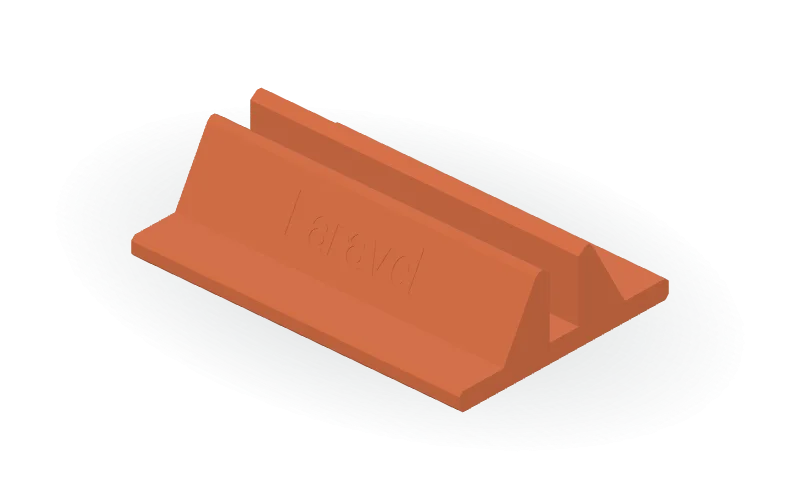
Vertical Laptop Stand with Laravel Engraving

Vertical Laptop Stand with Laravel Engraving

By Jonathon Ringeisen · Saved version 1

A customizable vertical laptop stand with a rectangular base, sloped supports, a beveled central channel, and recessed Laravel lettering on one outer face. Created for a 16-inch MacBook Pro desk-storage use case, the default model measures 180 × 124 × 46 mm with a 17 mm clear channel; check your laptop’s thickness before choosing the slot width. The OpenSCAD source includes self-contained vector lettering, so no external font is required. Editable parameters cover overall dimensions, base thickness, channel width, support and shoulder offsets, bevel sizes, and the lettering’s width, depth, and vertical position. The default inscription is 70 mm wide and engraved 0.6 mm deep. Available formats are STL, 3MF, and OpenSCAD.

Copy this community design to your library to customize it and download your saved version.

Log in to copy
Saved parameters

Values from version 1. Units are shown where supplied by the creator. These are model inputs; check the exported geometry and fit in your slicer.

Parameters for saved version 1
Parameter Value
Overall stand length (mm)180
Overall base width (mm)124
Overall stand height (mm)46
Base thickness and channel floor height (mm)10
Clear laptop channel width (mm)17
Distance from center to outer support foot (mm)36
Distance from center to upper outer shoulder (mm)17
Outer shoulder bevel size (mm)2
Distance from center to inner edge of top flat (mm)12.5
Channel entry bevel height (mm)3
Base perimeter bevel in the side profile (mm)2
Engraved Laravel word width (mm)70
Engraving depth normal to the sloping face (mm)0.6
Lettering center height above the bottom (mm)28

The creator has not added print notes yet. Check dimensions, orientation, supports, and material settings before printing.

Make this design your own

  1. Copy to your library. Log in and use “Copy to my designs” to create a private, editable copy.
  2. Adjust and preview. Change exposed parameters, edit the OpenSCAD code, or ask AI for changes. Save a new version when ready.
  3. Export and check. Download STL or 3MF for your slicer, or editable OpenSCAD. Check dimensions, build volume, orientation, and print settings.