Back to marketplace
Rounded-Front Pegboard Storage Cup with Adjustable SKÅDIS-Style Mounts

Rounded-Front Pegboard Storage Cup with Adjustable SKÅDIS-Style Mounts

By Jonathon Ringeisen · Saved version 1

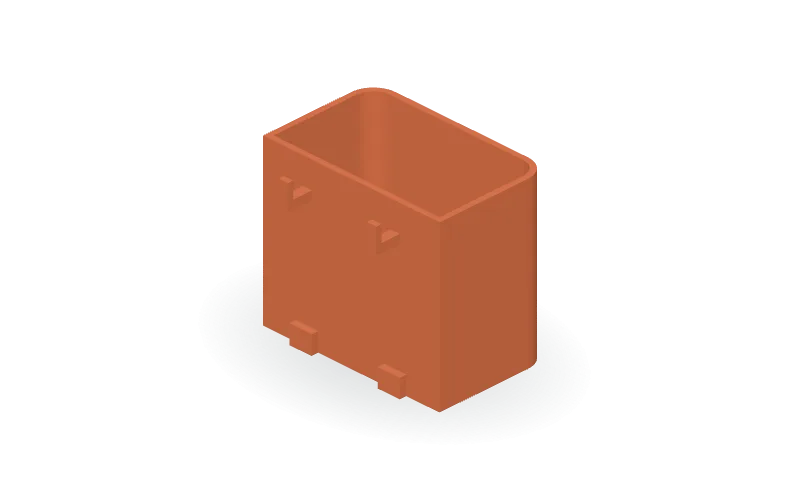
Organize small items with this parametric open-top storage cup, featuring rounded front corners, a flat back, two integral mounting hooks, and lower board standoffs. The default cup measures 80 × 50 × 70 mm externally, with 2.4 mm walls and a 3 mm floor. Edit the OpenSCAD parameters to change width, depth, height, wall and floor thickness, and corner radius. Separate mounting controls adjust clearance, slot dimensions, hook spacing, board thickness, hook geometry, and standoffs without tying them to the cup size. A switch generates a small mounting fit-test piece instead of the full cup. Intended for an IKEA SKÅDIS pegboard setup; verify slot width, slot height, spacing, and board thickness before relying on the fit. Available in STL, 3MF, and OpenSCAD formats.

Copy this community design to your library to customize it and download your saved version.

Log in to copy
Saved parameters

Values from version 1. Units are shown where supplied by the creator. These are model inputs; check the exported geometry and fit in your slicer.

Parameters for saved version 1
Parameter Value
Cup outside width80
Cup outside depth50
Cup outside height70
Cup wall thickness2.4
Floor thickness3
Outside front corner radius10
Mounting clearance per mating side0.4
Generate mounting test instead of cup (0 or 1)0
Nominal board slot width: verify5
Nominal board slot overall height: verify15
Horizontal slot center spacing: verify40
Board thickness: verify5
Cup-to-board front gap3
Vertical thickness of hook arm3.6
Retaining tip thickness along depth2.4
Tip rise above arm7
Hook arm distance below cup rim15
Lower standoff height8
Lower standoff width10
Test plate width56
Test plate height30

The creator has not added print notes yet. Check dimensions, orientation, supports, and material settings before printing.

Make this design your own

  1. Copy to your library. Log in and use “Copy to my designs” to create a private, editable copy.
  2. Adjust and preview. Change exposed parameters, edit the OpenSCAD code, or ask AI for changes. Save a new version when ready.
  3. Export and check. Download STL or 3MF for your slicer, or editable OpenSCAD. Check dimensions, build volume, orientation, and print settings.