Back to marketplace
Print-in-Place Fishing Hook Box with Captive Hinge and Snap Latch

Print-in-Place Fishing Hook Box with Captive Hinge and Snap Latch

By Jonathon Ringeisen · Saved version 8

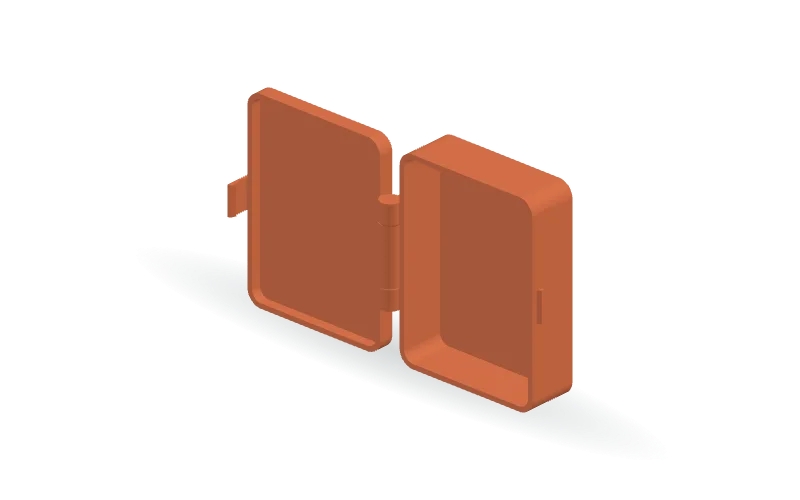
Keep fishing hooks and small tackle together in a rounded storage box with a single, undivided compartment. This parametric design features an attached lid, a print-in-place captive-axle hinge, and an external snap latch designed to release by pulling the tab outward. The hinge geometry incorporates its own axle rather than a separate hinge pin. Customize the box length, width, body height, lid depth, wall thickness, and corner radius in the OpenSCAD source. Hinge size, axle diameter, moving clearances, and latch geometry are also editable for fit adjustments. The model is supplied in an open configuration, with STL, 3MF, and OpenSCAD formats available.

Copy this community design to your library to customize it and download your saved version.

Log in to copy
Saved parameters

Values from version 8. Units are shown where supplied by the creator. These are model inputs; check the exported geometry and fit in your slicer.

Parameters for saved version 8
Parameter Value
Overall bottom length (mm)80
Overall bottom width (mm)60
Overall bottom height (mm)20
Wall thickness (mm)2
Base and lid roof thickness (mm)2
Outside corner radius (mm)6
Lid depth (mm)6
Total hinge length along the rear edge (mm)40
Hinge barrel outside radius (mm)4
Captive axle diameter (mm)3
Radial and axial moving-part clearance (mm)0.35
Length of each fixed end knuckle (mm)8
Front latch width (mm)12
Flexible latch tab thickness (mm)1.2
Latch extension below the closed lid rim (mm)7
Bottom catch projection from the front wall (mm)1.2
Latch running clearance (mm)0.3
Hook overlap with the catch (mm)0.5

The creator has not added print notes yet. Check dimensions, orientation, supports, and material settings before printing.

Make this design your own

  1. Copy to your library. Log in and use “Copy to my designs” to create a private, editable copy.
  2. Adjust and preview. Change exposed parameters, edit the OpenSCAD code, or ask AI for changes. Save a new version when ready.
  3. Export and check. Download STL or 3MF for your slicer, or editable OpenSCAD. Check dimensions, build volume, orientation, and print settings.